Track open bugs over time
Follow weekly or monthly trend lines to see whether backlog pressure is rising, stabilizing, or improving across the delivery system.
Bug / Defect Analytics Dashboard
Oobeya Bug / Defect Analytics turns issue data into a leadership-ready operating view. Track open and closed bugs over time, understand severity mix, compare team distribution, and drill into the items that need action first.
Inside Oobeya
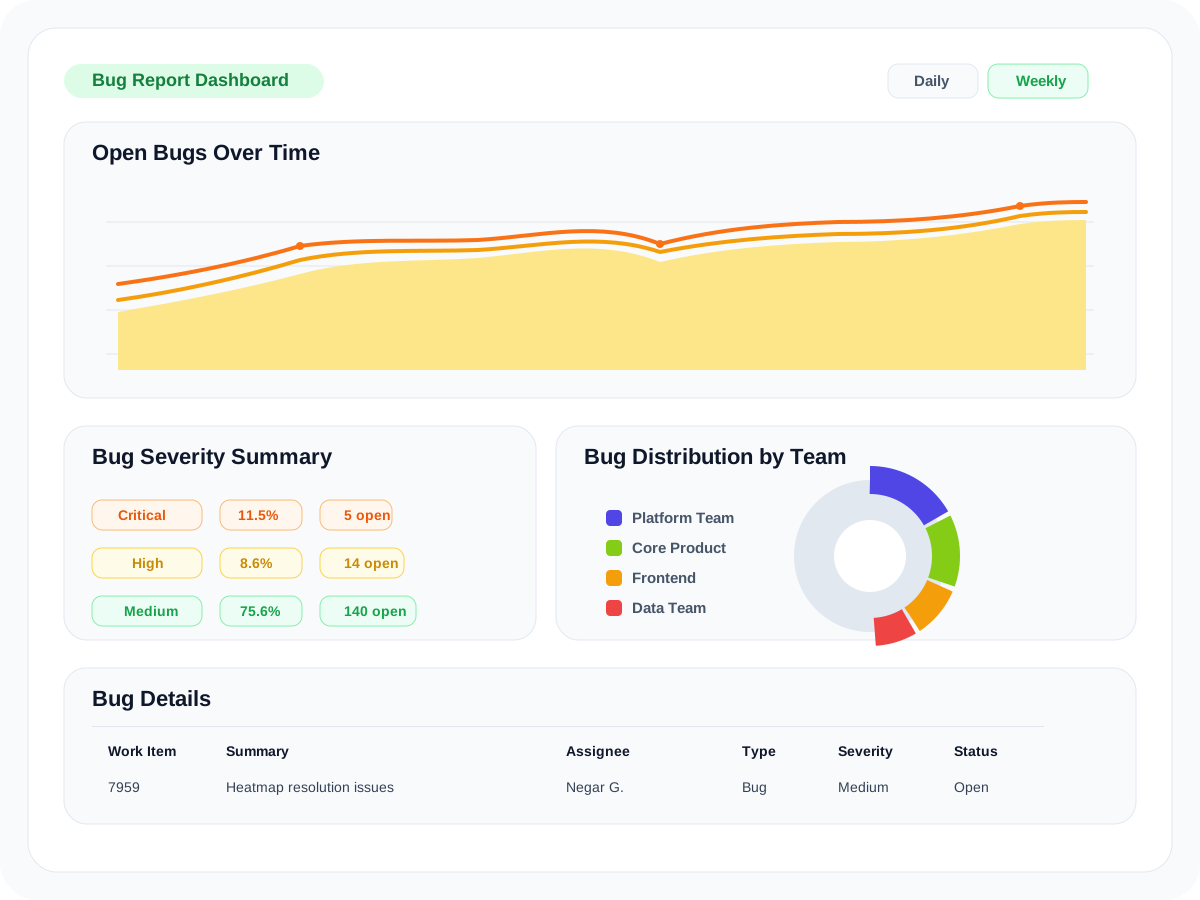
What teams can see
The dashboard shown in Oobeya is designed to help engineering leaders move from bug volume to bug context, without juggling multiple reports.
Follow weekly or monthly trend lines to see whether backlog pressure is rising, stabilizing, or improving across the delivery system.
Separate critical, high, medium, and low bug volume so teams can focus on the mix that matters most to delivery and quality risk.
See bug distribution by team to understand where load is concentrated and which groups may need attention, support, or process changes.
Move from aggregate trends into assignee, project, severity, status, and work item detail without leaving the operating view.
Integrated bug intelligence
Oobeya Bug / Defect Analytics brings work item data into one operating layer so teams can review bug trends, severity, assignees, and backlog movement without stitching dashboards together manually.

Pull bug type, severity, assignee, project, and status into one shared operating picture.

Use board-driven work item signals to compare open bugs, team ownership, and trend movement over time.
How teams use it
The value of the module is not just reporting. It is the ability to move from trend, to severity, to ownership, to the exact work items that need attention.
Catch whether open bug volume is climbing before it becomes normalized backlog noise.
See whether the load is mostly medium-volume maintenance work or whether critical and high issues are growing.
Compare teams, assignees, and projects to find where bug ownership and workflow pressure are concentrated.
Open the issue-level table to move from summary to action without losing operational context.
FAQ
The module is designed for teams that want cleaner bug visibility without stitching together dashboards from multiple systems.
It gives teams a shared view of open bug trends, severity distribution, team ownership, and issue-level detail in one operating layer.

Customer story
Sicredi connects 3,000+ developers and 10,000+ repositories in Oobeya, giving a large, distributed engineering organization one trusted view of delivery, governance, productivity, and platform health.
Watch story
Use Case
SD Worx evaluates tribe-based delivery metrics across around 100 development teams in 10+ countries, helping distributed engineering groups compare delivery health with one shared language.

Use Case
Turkcell brings 4,000+ developers, thousands of repositories, and multiple group companies into a shared visibility model for DevOps standardization, AI metrics, and portfolio-level engineering insight.

Use Case
Koc Group, a Fortune 500 company, uses Oobeya to assess 2,000+ developers across 10+ group companies on one platform, aligning diverse industries around the same engineering assessment model and improvement rhythm.

Use Case
TEB, a BNP Paribas company, uses Oobeya to turn Azure DevOps and SonarQube data into clearer improvement priorities, helping enterprise teams move from fragmented metrics to practical, comparable recommendations.

Use Case
Etiya uses Oobeya to make telecom software delivery measurable across complex teams, with the Gamification module helping drive engagement around process health and improvement signals.













































Ready to review bug health differently?
See how Oobeya Bug / Defect Analytics works with Jira and Azure Boards to make open bugs, defects, severity, and ownership easier to act on.
You are safe with us


